# Sending SMS Messages in Kizen with Twilio
{% hint style="success" %}
**Audience:** Admins, Developers, Solution Architects
**Purpose:** Explains how to send SMS messages in space.vars.Kizen\_company\_name using a connected Twilio account, including single-contact, bulk, and space.vars.automation-based messaging.
{% endhint %}
## Overview
This page explains the ways SMS messages can be sent within space.vars.Kizen\_company\_name after a Twilio account has been configured.
Once connected, SMS messages can be sent:
* From an individual space.vars.contact space.vars.entity
* As a bulk action to multiple space.vars.contacts
* Automatically through space.vars.automation space.vars.workflows
In all cases, space.vars.Kizen\_company\_name sends the message using the Twilio credentials stored in **Settings** > **Privacy Settings**, and Twilio handles carrier delivery.
***
## Before You Begin
Before sending SMS messages in space.vars.Kizen\_company\_name, ensure:
* A Twilio account is connected under **Settings** > **Privacy Settings**
* A valid Twilio phone number is configured
* The Contact record(s) include a valid phone number
* You have permission to perform bulk actions or configure automations (if applicable)
Keep in mind:
* space.vars.Kizen\_company\_name supports only one Twilio phone number per business
* All SMS messages are sent from that configured number
* space.vars.Kizen\_company\_name does not manage A2P 10DLC registration or carrier compliance
* Delivery logs and detailed error information are available in Twilio, not in space.vars.Kizen\_company\_name
If Twilio is not configured, SMS options will not be available. Learn more about the [Twilio Configuration](https://developer.kizen.com/docs/integrations-and-plugins/integrations/twilio-sms/configuring-twilio-sms).
***
## How SMS is Sent within Kizen
Once your Twilio account is connected in space.vars.Kizen\_company\_name, SMS messages can be sent in one of three ways:
### Send a Single SMS to a Contact
You can send an SMS directly from an individual space.vars.contact space.vars.entity.
{% stepper %}
{% step %}
#### Open the Contact
1. Go to **Data** > **Contacts**.
2. Click the space.vars.contact’s name to open their space.vars.entity.
{% endstep %}
{% step %}
#### Select PERFORM ACTION
1. In the top right corner of the space.vars.contact space.vars.entity, select **PERFORM ACTION.**
2. Select **Send Text** from the dropdown.
{% endstep %}
{% step %}
#### Compose the Message
1. Enter your message in the text field.
2. Review the phone number associated with the space.vars.contact.
3. Click **CONFIRM** to send.
{% endstep %}
{% endstepper %}
#### What Happens Next
* space.vars.Kizen\_company\_name sends the message to Twilio using your configured credentials
* Twilio routes the message to the carrier
* Delivery status and logs are available in your Twilio account
{% hint style="info" %}
**Note:** space.vars.contacts may opt out of SMS messaging through Twilio. Twilio tracks and enforces opt-out status, and messages cannot be sent to space.vars.contacts who have opted out.
{% endhint %}
### Send Bulk SMS to Multiple Contacts
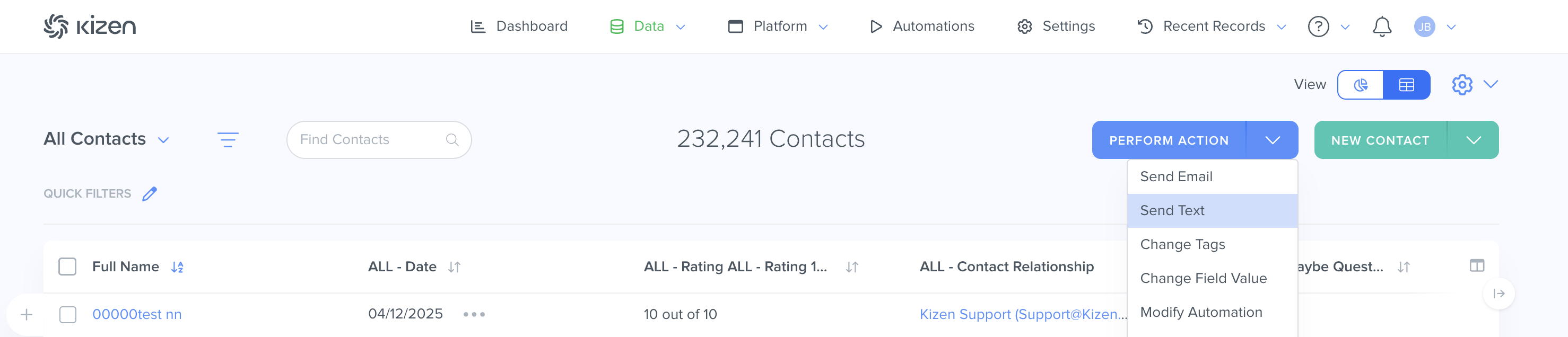
You can send a text message to multiple space.vars.contacts at once using **PERFORM ACTION** > **Send Text**.
{% stepper %}
{% step %}
#### In your top navigation, select **Data** > **Contacts**
Select all of the space.vars.contacts you want to message using the checkboxes.
You can select:
* Individual space.vars.contacts
* All space.vars.contacts on the page
* All space.vars.contacts in your search results
* All space.vars.contacts in a saved group
{% hint style="info" %}
**Note:** If you do not select space.vars.contacts first, you will be prompted to select them before composing your message.
{% endhint %}
{% endstep %}
{% step %}
#### Select **PERFORM ACTION** > **Send Text**
In the dropdown menu, select **Send Text**.
{% endstep %}
{% step %}
#### Compose Your Message
The **Send Text** screen appears.
1. Enter your message in the text field.
2. Review the number of recipients.
{% hint style="info" %}
**Note:** If Twilio is not configured, you will see a message indicating that a text messaging provider must be set up.
{% endhint %}
{% endstep %}
{% step %}
#### Confirm and Send your SMS Messages
1. Click **NEXT.**
2. Review your message.
3. Click **CONFIRM** to send.
{% endstep %}
{% endstepper %}
### Send Bulk SMS Using Automation Workflows
SMS can also be sent through space.vars.automation space.vars.workflows. space.vars.automations allow SMS to trigger automatically based on any space.vars.automation trigger, such as:
* space.vars.entity updates
* Status changes
* Time-based conditions
* space.vars.workflow events
Common use cases include appointment reminders, task notifications, form follow-ups, and event alerts. For more information about using SMS actions in space.vars.automations, see **Automations** **(Coming Soon)**.
{% hint style="info" %}
**Note:** SMS messages sent through Twilio from space.vars.Kizen\_company\_name consume messaging credits associated with your license. Ensure your business has sufficient messaging credits available before sending high-volume or automated SMS messages.
{% endhint %}
***
## What’s Next
For higher-volume or automated messaging, review your space.vars.automation setup and trigger configuration, your compliance requirements (including A2P 10DLC for U.S. messaging) and your Twilio delivery logs and account health monitoring
Ensure your messaging workflows align with consent, carrier policies, and business communication standards before scaling SMS usage. If you haven't done so, learn how to [Configure Twilio in Kizen](https://developer.kizen.com/docs/integrations-and-plugins/integrations/twilio-sms/configuring-twilio-sms) or check out the topics below:
Related Topics
* [Twilio SMS](https://developer.kizen.com/docs/integrations-and-plugins/integrations/twilio-sms)
* [Configuring Twilio SMS](https://developer.kizen.com/docs/integrations-and-plugins/integrations/twilio-sms/configuring-twilio-sms)
* [Integrations](https://developer.kizen.com/docs/integrations-and-plugins/integrations)
* [Contacts](https://developer.kizen.com/docs/concepts)