Eliminating Schema Hallucinations in AI Systems with DAGs
Learn how to turn natural language into guaranteed-valid filters using a DAG-based LLM architecture that prevents hallucinations and schema errors.
January 7th, 2025 | Written by Mordechai Worch | 10 Min 📖

Natural language is messy. Filters are precise.
At Kizen, we spent years building a powerful filter engine, composite query architecture, relationship filters, activity tracking and custom fields across dozens of object types. It handles everything from “show me active leads” to “contacts whose company has more than 100 employees AND submitted a form in the last 30 days OR triggered our welcome automation.”
Then we tried to let users build these filters with natural language.
Modern LLMs excel at grasping intent. If a user asks for ‘active leads,’ the model knows exactly what that means conceptually. The problem arises when that concept hits the rigid reality of a database schema.
LLMs are confident improvisers. They often generate payloads that look perfect to the human eye but are gibberish to a compiler, inventing field names that don’t exist or syntax that your engine never supported. The result isn’t a working filter; it’s a silent failure.
Our solution: decompose filter intent into a directed acyclic graph (DAG) of logic fragments, where every path through the graph produces a valid filter. No hallucinations. No invalid combinations. Just guaranteed-valid output.
Why Dumping your Schema into an LLM Doesn’t Work
Our first approach was obvious: give the LLM our complete filter schema and ask it to generate valid JSON. It failed spectacularly.
The complexity is combinatorial. We are bridging the gap between a probabilistic LLM and a deterministic query engine designed for exact precision. While the LLM deals in “likely” tokens, our engine requires strict type alignment to maintain data integrity:
“
equals” works on text fields.“
greater_than” works on numbers.“
contains_any” works on multi-select fields.“
between” works on dates.And dozens more condition-field type combinations.
Multiply fields × conditions × values × boolean groupings and you get thousands of valid combinations — but millions of invalid ones. LLMs generate plausible-looking output that crashes our parser or, worse, fails silently:
Hallucinated fields: “filter by
customer_tier" when the field is actually calledmembership_level.Invalid conditions: Using
equalson a date field instead ofon_date.Malformed groupings: Nested AND/OR logic that doesn’t match our query structure.
When a user says “customers who signed up last week OR have premium status AND live in California,” the boolean logic must match our exact query format. One wrong bracket and the filter returns garbage.
Not All Filters Are Created Equal
Before diving into the solution, it helps to understand what we’re dealing with. Our filter engine supports seven distinct filter types, each with different structures:
Description of Different Filter Types
Field Filters
Filter on record's own fields
status equals active
Relationship Filters
Filter on related object's fields
company.employee_count>100
Relationship Group Filters
Use saved filter groups from related objects
company in 'Enterprise Accounts' group
Logged Activity Filters
Filter by activities recorded on records.
had a meeting in last 30 days
Scheduled Activity Filters
Filter by upcoming activities
has call scheduled this week
Form Submission Filters
Filter by form responses
submitted 'Contact Us' form
Automation Filters
Filter by automation execution
triggered 'Welcome Email' automation
Team Interaction Filters
Filter by interactions with employees
contracts John reviewed in last 2 weeks
Each filter type has its own valid conditions, value formats, and nesting rules. A field filter on a text field accepts different conditions than a field filter on a date field. A relationship filter, by contrast, must also specify the related object and the field on that object.
This complexity is exactly why naive prompting fails and why DAG decomposition works.
From Messy Input to Structured Intent
Before walking the DAG, we need to understand what the user actually wants. Consider this input:
“Show me customers who bought something last month and haven’t been contacted”
This input contains two distinct filter conditions combined with AND logic, which must be processed independently.
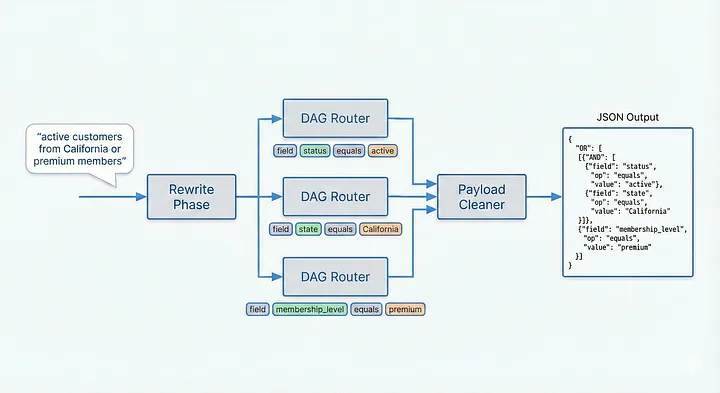
The Rewrite Phase uses an LLM to decompose user intent into structured filter statements:
For the input “active customers from California or premium members,” rewriting produces:
Each filter in the list gets processed through the DAG independently, then combined at the end. This parallelizes the work and keeps each DAG walk focused on a single filter intent.
Breaking Intent into Steps
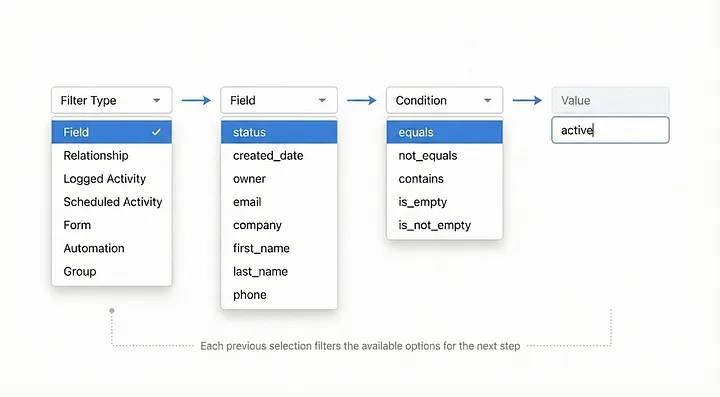
Instead of asking the LLM to generate a complete filter in one shot, we break the problem into constrained steps:
Choose filter type: field, relationship, activity, etc.
Choose field (for field filters): only fields that exist on this object.
Choose condition: only conditions valid for that field’s type.
Provide value: only value formats that work with that condition.
At each step, the LLM sees only valid options. When you select a text field, you don’t see date conditions. When you select “equals,” you provide a string, not a date range.
We built a lightweight custom router (not LangGraph or similar frameworks) to keep the logic simple and debuggable:
The result is a system where invalid filters cannot be generated. Every path through the DAG produces output that is valid for our filter engine.
Making the LLM Color Inside the Lines
Now that we have steps, how do we guarantee each step’s output is valid? Modern LLMs support structured output, forcing responses to match a specific JSON schema. Instead of free-form text that might hallucinate invalid values, the LLM must return valid JSON matching a Pydantic model.
This is the secret sauce: at each DAG step, we generate a dynamic Pydantic model containing only valid options for that specific point in the graph. This also saves tokens, since we’re not feeding the LLM the schema for date filters when it’s processing a text field.
The LLM cannot hallucinate invalid field names because dynamic enums constrain it to exact valid options. For dates, we break the value into typed components (year, month, day) with built-in bounds validation, no string parsing, no format errors.
Structured outputs + dynamic schemas = the LLM can only produce valid fragments, making invalid output impossible by construction.

Executing the DAG
The Router walks the graph, accumulating fragments at each step:
Fragments accumulate in a simple structure:
Each completed filter becomes a list like ["field", "status", "equals", "active"], guaranteed valid, ready for conversion.

Walking Through Real Filters
Let’s trace some examples through the DAG:
Example 1: Simple field filter
Example 2: Relationship filter
Example 3: Activity filter
Each walk produces a valid fragment list. No hallucinations, no invalid combinations.
Trust, but Verify
Even with DAG constraints and structured outputs, we add guardrails for edge cases:
Pre-flight checks:
Is this actually a filter request? (vs. a general question)
Does it reference fields that exist on this object?
Is it asking for something our system can express?
Runtime validation:
Max iteration limits prevent infinite loops.
Invalid responses trigger retry with error context.
Guardrails catch edge cases the DAG structure can’t prevent, such as requests that are technically valid filters but nonsensical (“filter where email equals 42”).
Cleaning Up: From Fragments to System Format
With validated fragments in hand, the final step is converting them to your system’s expected format.
The DAG produces raw fragments, simple lists for example: ["fields", "status", "equals", "Active"]. These are semantically valid but not yet in the format your system expects.
A payload cleaner step transforms fragments into your target schema:
This separation is intentional, think of it like a compiler. The DAG produces an intermediate representation (IR): semantically valid fragments that capture user intent. The payload cleaner then compiles this IR to your target format, mapping field names to IDs, converting values to your schema’s expected types, building nested structures.
Why separate them? Because the DAG logic stays clean and testable, while system-specific formatting lives in one place. When your schema changes, you update the cleaner, not the entire DAG.
The Cost of Decomposition
Let’s be honest: this approach uses multiple LLM calls instead of one. That has costs.
When this is overkill:
Simple schemas with few valid combinations.
One-off scripts where validation errors are acceptable.
Latency-critical applications where multiple round-trips hurt UX.
Development cost:
Each filter type requires its own DAG branch, step definitions, and payload cleaner.
Adding a new filter type means implementing the full pipeline, not just updating a prompt.
Upfront investment is significant; payoff comes from reliability at scale.
Inference tradeoffs:
More calls = more latency (each step waits for the previous steps).
More calls = higher token costs.
But: each call is simpler, more reliable, and easier to debug.
Latency Mitigation Strategies
Prompt Caching
LLM providers such as OpenAI and Gemini provide native caching for prompt reuse reducing latency and cost.
Prompt Compression
Minimize context passed to each step
Step Merging
Combine low-risk steps (e.g., field + condition in one call)
Parallel Processing
Process multiple filters concurrently
Fast-Forward Steps
Skip LLM call when only one valid option exists
Comparing Architectures: The Engineering Trade-offs
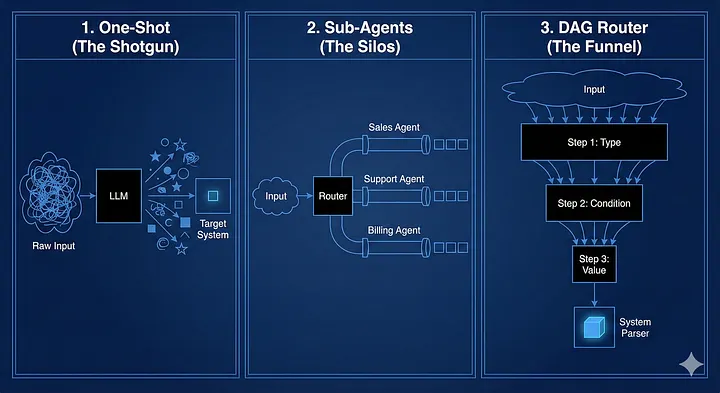
While the DAG approach solved our specific constraints, it isn’t the only way to build agentic systems. Here is how the architectures stack up:

1. One-Shot Prompting (Optimized for Speed)
Best for: Independent Variables.
Why: If you ask for
NameandAge, the model can predict both simultaneously because your name doesn't change the valid format of your age.The Trap: It fails when variables are interdependent. If choosing “Field A” radically changes the valid options for “Operator B,” the one-shot model tries to hold the entire decision tree in its context window at once. It’s fast, but brittle.
2. Specialist Sub-Agents (Optimized for Breadth)
Best for: Disconnected Domains.
Why: Great for keeping distinct logic separate, like routing “Sales Questions” vs. “Support Tickets” to different prompts.
The Trap: Sub-agents struggle with shared state. If the “Date Agent” needs to know exactly what the “Field Agent” selected to validate its bounds, you end up passing massive context blobs back and forth, reintroducing the complexity you tried to avoid.
3. Structured DAG Router (Optimized for Dependencies)
Best for: Cascading Constraints.
Why: This is the only architecture where Output A defines the Schema of Output B.
The Win: When the LLM picks a “Date Field,” the DAG strictly prunes the universe of next steps. The “Text Operators” (like
contains) literally cease to exist as options. The model can't hallucinate them because they aren't in the available schema.
The Verdict: If your outputs constrain each other (e.g. Field Type → determines Condition → determines Value Format), you cannot rely on probability. You need the architectural enforcement of a DAG.
Where Else Can You Use This?
DAG decomposition isn’t just for filters. The pattern applies anywhere you need to translate fuzzy intent into precise structure:
Workflow engines: Decompose “send email, wait 2 days, check response” into step DAGs.
Query builders: Natural language → SQL/GraphQL with constrained options per step.
Form generators: “Create a signup form with email validation” → structured form config.
Low-code platforms: Translate business intent into executable configuration.
Anywhere you need to constrain LLM output to match a specific system’s requirements, DAG decomposition keeps the output space manageable.
Key Takeaways
DAG decomposition guarantees validity: Every output works with your existing system.
Constraining LLM choices at each step: Dramatically reduces hallucinations.
Fragments provide composability: Same logic, different output formats.
The pattern generalizes: Beyond filters to any structured output generation.
Trade-offs exist: More LLM calls, but each is simpler and more reliable.
At Kizen, this approach transformed our AI filter builder from a brittle experiment into a production-ready feature. The next time you’re tempted to dump your entire schema into an LLM prompt, consider breaking the problem into steps. Because ultimately, reliability isn’t a prompting problem, it’s an architecture problem.
Last updated
Was this helpful?